SOCIAL BOOKMARKING

Folksonomy is the collaborative tagging or cataloging of different websites. These sites can be articles, photos, products and/or bookmarks. It became popular in 2004 and is a characteristic of web 2.0. Collective tagging, tagging, social tagging, social indexing, and collaborative tagging all have the same meaning as folksonomy. Folksonomy can be done online using websites like “delicious” or offline using “library records”. The word folksonomy is derived from folk meaning done by people and taxonomy meaning classification of items or groups.

Here's a badge to my bookmark on delicious -


Although I’m still exploring these kinds of social tagging websites I’ve come across the following:
ADVANTAGES:
1. An easy way to classify web content
2. A cheap method to classify web content
3. Has the capability to adapt to the users style
4. Provides additional keywords to help search engines
5. Provides additional navigation on your site; for instance index referencing – helps users find related post content

DISADVANTAGES:
1. Some tags may exit with a different meaning (polisemy)
2. Some tags may exit with similar meanings (synonyms)
3. Language barrier
4. Anti-spam measure is high
5. Acronyms and Abbreviations

Depending on how one uses social bookmarking sites, I can see it as a democratic taxonomy that allows the community to peer review the content of the web. However, this depends just like a democratic system on how effective the community participates. For example, the more people that use social bookmarking sites (by tagging information) the more powerful the tool becomes.

On the other hand, I can also see it as a disorganized collection of personal preferences, simply because of a no hierarchical system. Hierarchy is good to avoid the creation of overlapping content, for instance multiple tags of “usability” allows for much of the subtlety but few of the restrictions of hierarchy.

Bookmarks I selected be it websites, blogs and/or articles are in relation to topics centered on Elements of Visual Design. These bookmarks include web design, web 2.0, usability, typography, proposals, and technical writing. As stated in my first blog post the essence of this blog is to educate myself on technical communication. For instance, some of the sites I bookmarked narrates and teaches users on web designs. Take for instance this site everybodygoto , it helps give pointers on elements you should take into consideration when designing a website. I also, tagged typography sites, because the need to communicate your message is more important than the actual message itself. In essence, the need to use a correct type is another important feature whether creating a website, writing a blog or constructing a proposal. This brings me to my next point, proposal writing which is also included as part of my bookmarks. I included a very helpful guide to assist anyone in writing a proposal. Finally, another area I focused on was on technical writing which is a most have skills, needed in technical communication. These technical writing blog and sites explains how reader’s eyes navigate through your page. It therefore explains helpful tips to present written information.

Social bookmarking is beneficial to students and professionals in more ways than one. Students can use social bookmarking as tool to find tags related to their subject, research or course topics quickly. This not only enables the collaboration of like-minds but is a powerful source that demonstrates the power of sharing. In addition to this, students from around the world can share their bookmark collections with other students and professors. This in turn can help students collaborate on research, projects and/or assignments. Also, this can be dynamic tool by enabling students to become active learners. Professionally, social bookmarking sites in my opinion scream out efficiency. This networking site allows the sharing and meeting of professional contacts by commercially developing tags for ease.

Reference:


Bookmarking: The New Folksonomy


Wiki: Social Bookmarking


AFTER THE DOT COM BUST

Web 2.0 can mean anything. The story about web 2.0 dates back to Tim O’Reilly and Medialive International’s brainstorming session in 2004. The conference resulted to define web 2.0 to mean the web as a platform. Of which I felt translated to the gist of web based applications. Web 2.0 suddenly changed its meaning by the second conference to mean something about democracy.


The meaning of Web 2.0 has evolved with time, not placing a clear-cut definition to the term. Therefore, I’ll define web 2.0 as the most powerful web based application yet. This can also be seen as the ever changing web application platform from the initial document delivery system. Web 2.0 is evolving into a more collaborative and personal means of communication to easily be able to receive data at ones fingertips. With the talk of web 3.0, web 2.0 will be precedent like web 1.0. This is where core web applications that were in existence during the era of web 1.0 are now a thing of the past. Listed below are web 1.0 applications versus 2.0:


Netscape vs. Firefox

Encantra vs. Wikipedia

AltaVista vs. Google

Mapquest vs. Google Maps

Geocities vs. Blogger


The question now is that, what differentiates the above web 2.0 applications in comparison to its precedent? Could it be …


Open Data

Today data and information are readily available to the public. Also, users (like you and l) are creating ideas and publishing it for everyone to access. This I’d like to call user created ideas, where users not only stipulate their ideas but own their ideas and data.


Architecture of Participation

The infrastructure of the web 2.0 application is built in a way that provides a service (infoware) to users and not a product (software). This gives users a sense of ownership in a community, where everything is built so easily that customer support is self service. This in turn will encourage users to contribute ideas by providing reviews and comments, which is a determining factor in any growing business.


Rich User Experience

Unlike the pioneer web 1.0, web 2.0 is continually becoming pleasurable to work with. The social networks available are easy to use, contain rich user interface but most importantly function like a traditional application.


Social networking sites like Facebook, MySpace, twitter and hi5 just to mention a few are aspects of web 2.0 that really interest me. In my definition above I mentioned that “web 2.0 is an ever changing web based application”, the following example will further explain my definition. Take for instance Facebook, which initially started as a social networking site directed to young adults for friends and family, long lost friends/family and the likes. This site eventually started escalating into something more each day. A few years back, Facebook added the instant messaging tool to their site to communicate directly with friends online. Also, over the years they have offered an array of services to individuals, businesses and students which have attracted a higher demographic rate. Among the many tools and services Facebook offers it is the ability for students to search for jobs and apply to colleges. Companies advertise not only products and services, but job openings on Facebook given students the opportunity to apply. Students also have the flexibility to sell and purchase goods from friends and others. The list goes on with Facebook, and because of the applications and what-not that they integrate into their website I’ve lost track of them. These social networking websites have really defined what I believe web 2.0 is an ever growing and changing society. I’m positive that by the end of next year Facebook will most likely integrate phone calls via the internet. There is always more to come with these social networking sites that enhance the means of communication.


I believe at the moment we are in a transition stage, we are moving steadily past through web 2.0. I would like to look at Web 2.0 as some sort of transition technological period, as a means of getting to our destination – Web 3.0. The reason for the above statement is because according to research web 3.0 unlike web 2.0 will be a much more open web application. In other words, web 3.0 I believe will be a more intelligent web application, with natural language processing and machine based learning and reasoning. Whereas, web 2.0 is still mostly about social networking and mass collaboration. So we are still at a leap to web 3.0 but nonetheless coming closer each day to something amazing.


As far as web 3.0 goes I’ve head about the following acronyms RAIM (Rich Anywhere Interface App) or WORAG (Write Once Run Anywhere GUIs). Take a look at Nova Spivack’s Twine (http://www.twine.com/), its goal is to organize, share and discover information of like minded individuals. Apparently they are the first to use web 3.0 technologies – using semantic technologies powered by semantic understanding. Basically twine is an example of how web 3.0 will work, using the social elements of web 2.0 with user specific Semantic web tools. In summary, I believe web 3.0 will be anything that comes after web 2.0.


I believe Tim O’Reilly latest definition of web 2.0 is “Web 2.0 is the business revolution in the computer industry caused by the move to the internet as platform, and an attempt to understand the rules for success on that new platform. Chief among those rules is this: Build applications that harness network effects to get better the more people use them. (This is what I've elsewhere called "harnessing collective intelligence."). Actually this definition was in response to commentators post on his topic - Web 3.0? Maybe when we get there.


I believe that the commercial use of web 2.0 tools is not significantly different from the use in education and by individuals. First and foremost, the essence of web 2.0 tools I believe is to communicate a message better, most often in real time. I believe that is the ultimate use of web tools; be it used commercially or otherwise the need to communicate a message is key. However, the way the message is conveyed using these web tools vary significantly. Take for instance, the way a message is conveyed to a student by a teacher using a web tool – these educational tools used integrate technology into the classroom. On the other hand, web tools used commercially are centered upon attracting customers to their website for business purpose.


Reference


http://www.wiziq.com/tutorial/86-Moving-from-WEB2-0-to-WEB-3-0

http://www.labnol.org/internet/web-3-concepts-explained/8908/

http://www.andybudd.com/presentations/dcontruct05/

http://theopensourcery.com/dhtml3.htm

http://www.youtube.com/watch?v=bsNcjya56v8

http://www.go2web20.net/

http://internet.suite101.com/article.cfm/what_is_web_30

http://radar.oreilly.com/archives/2006/12/web-20-compact-definition-tryi.html

WORKING WITH CAMBRIA TYPEFACE

Say hi to


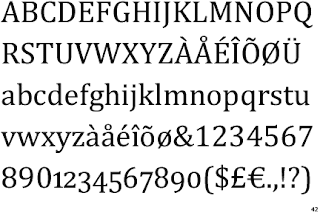
Cambria Regular is the default serif font in Microsoft Office 2007. It was designed by Jelle Bosma, Steve Matteson and Robin Nicholas. The purpose of this typeface is to give a clearer on-screen depiction. Fonts similar to Cambria are Diverda Serif, Eidetic Neo, Karmina and Prensa. This typeface is distributed with Windows Vista, Windows 7, Microsoft Office 2007, Microsoft Office 2008 for Mac, and Microsoft Office 2007 viewers and converters. The typeface publisher is Microsoft Typography.

I’ve always liked this typeface; I’ve used it for everything from term papers, emails, business documents, web designs to presentations. Cambria has a “sturdy” appearance to me. I feel like it’s an accurate reflection of how I want majority of my work to be conveyed. Unlike the casual feel of Times, Arial, Helvetica or Century Old Style just to mention a few, it comprises simultaneously of the most important characteristics: formality and solidity. This typeface to me is seen as something strong and serious, yet not too stern that it scares away the audience.

Coupled with external research on typeface, I’m going to be using Kathleen Burke Yoshida’s article on “Avoiding Typeface Terrors” to help analyze what technical communicators should consider when selecting a typeface. The article discusses test requirements to ensure communication is in a clear and creative manner. This post is going to concentrate on the following typeface topics:


  1. Legibility (the clarity of the letters) In the article “Avoiding Typeface Terror”, Kathleen refers to legibility of a typeface as the degree of the letters recognition. In other words, how legible the letters are whether they are standing alone or are in combination with one another.

Let’s determine if Cambria passes the legibility requirement. To determine legibility for Cambria, place a piece of paper over the top or bottom half of the words. If you can read the words easily by just looking at half of the letters, then Cambria is likely perceived as legible.

Notice that I mixed the type size, variation and included numbers in the graphic above. This I believe will better create a more diverse foundation to answer the question. I can make out each word and number, whether the top or bottom half is covered by a piece of paper. Therefore, Cambria passes the legibility test. Now let’s try readability.


  1. Readability (the ease of reading the letters)

I know you may be wondering what the difference between legibility and readability is, but these are two distinct typeface considerations. Unlike legibility, readability according to Kathleen refers to how easily the typeface can be read. Take for instance, the above Cambria graphical text representation. We are going to determine if the typeface passes the test using format elements such as: white space, type (point) size, and typeface variations.

a. White Space – This refers to how easily the words breathe, and if they have adequate white space separating each other to make the text readable. Keep in mind, that too much space will impose a problem on the readability of the text. On the other hand, too little space will cluster the text therefore making it difficult or impossible to read. In my opinion, Cambria excels here too, it has very even spacing and proportion.

b. Type Size – This refers to the point size you select for your text. In my opinion, Cambria has a strong feel to it already, therefore you need to be very careful when choosing font size. I usually use 12-point for most body text. This I feel is legible and readable enough to avoid complications.

c. Typeface Variations – This refers to elements such as italics, bold, all caps and underlines. Above, Ive displayed a variety of Cambria text in bold, italics, all uppercase etc. Obviously the text is very much readable here, which means it passes this test. However, like stated above Cambria has a strong appearance, so bolding letters or words should definitely be used when necessary.


  1. Personality (the feeling conveyed from Cambria)


The article does not explicitly state a test used to determine a typeface personality. However, it explains that a typeface should complement rather than distract one from the document’s purpose and message. I agree with Kathleen when she says “A typeface’s personality is ultimately determined by a reader’s perception”. I would classify Cambria in general as a conventional typeface. This is because of its formal appearance that this characteristic makes it appropriate for business documents. It also can be used for any long text like; term papers, novels, books and the like. I would prefer to refer to Cambria as the “all purpose body typeface”.


References:

Yoshida, B. Kathleen “Avoiding Typeface Terrors” - http://www.stc.org/confproceed/2000/PDFs/00006.PDF

http://www.identifont.com/find?font=cambria&q=Go

http://www.poynter.org/column.asp?id=47&aid=78683

http://en.wikipedia.org/wiki/Cambria_(typeface)